• Home
  • Homepod
  • AirPods
  • AppleTv
  • Macbook
  • Support
  • FAQ
  • About Us
  • More
    • Home
    • Homepod
    • AirPods
    • AppleTv
    • Macbook
    • Support
    • FAQ
    • About Us
  • Home
  • Homepod
  • AirPods
  • AppleTv
  • Macbook
  • Support
  • FAQ
  • About Us
Apple-first smart homes for existing households.

Apple ecosystem integration specialist.

ReBuildHome turns the appliances you already own into HomeKit accessories, installed in your existing home.

reBuildHome

Your existing appliances, now part of Apple Home.

Most homes in India are already full of good appliances: ceiling fans, lights, split ACs, TVs and geysers. None of them were built to talk to your iPhone. ReBuildHome changes that without replacing a single one.

Our technicians fit a small ReBuildHome Controller inside your existing switch board. It connects to the wiring behind your switches, so each fan, light and socket appears in the Home app as its own HomeKit accessory. Your AC, TV and curtains can join too, through our IR and RF hub, which sends the same signals as their remotes.

Once installed, your old appliances behave like smart ones. Ask Siri to switch them, put them in scenes like "Goodnight" or "Movie time," and let them run automatically when you arrive, leave, or the room gets too hot. Your wall switches still work exactly as before, so everyone at home can keep using them as they always have.

There's no rewiring of the house, no breaking walls, no new switch panels and no new appliances to buy. A typical installation takes a few hours. Our team plans it in a site visit first, then installs, sets up your Home app and shows you how everything works.
The ReBuildHome Story

In June 2016, Apple took the WWDC stage and introduced the Home app in iOS 10. Every accessory sat in one place. Scenes like "Good Night" ran with a tap. Siri took voice commands, and automations fired by time, location or sensor, with Apple TV keeping your home connected while you were away. It was the smart home we had been waiting for. But in Indian homes, almost nothing worked with it.

So in 2017, at our repair bench in Noida, we built our own. A Raspberry Pi 3, a few relays and some Python code turned an ordinary fan and light into accessories in the Home app. It worked, and we kept improving it for years.

In 2026, ReBuildHome grew up. The Raspberry Pi became a dedicated controller built on the ESP32-S3, a fast, low-power chip with built-in Wi-Fi. Its firmware runs on HomeSpan, an open-source library that lets the controller speak HomeKit natively and pair directly with your Apple ID.

Open source keeps us honest. Our foundation is public, tested by a worldwide community, and has no hidden cloud or account behind it.

Today, ReBuildHome brings what Apple promised in 2016 to the homes you already live in.

Your home should feel like an extension of your iPhone

Welcome to ReBuildApple Home - Your One-Stop Shop for HomeKit Supported Automation

We are specialists in Apple ecosystem automation integration, providing a Privacy-First Apple Home Automation System.


Our services include:


- Native Apple HomeKit integration with the Apple Home App

- Siri voice control for seamless smart home integration

- HomeKit secure automation to safeguard your devices

- Room-based device control for personalized environments

- Presence and geolocation automation for enhanced convenience

- Local control (no cloud required) for privacy protection

- Scene and schedule automation to match your lifestyle

- Remote access via Home Hub for flexibility

- Compatibility with existing home retrofit systems

- Support for iPhone, iPad, Apple Watch, and Mac devices


Minimum Requirements:


For a Basic Apple Home Setup📱: 

- iPhone or iPad running the latest version of iOS/iPadOS with the Apple Home app installed.


🏠 Apple Home Hub:

- Apple TV 4K, HomePod mini, or HomePod is required for remote access and advanced automations.


⚡ Rebuild Apple Home Controller:

- Must be installed and connected to your home’s electrical circuits.


🌐 Home Network:

- A Wi-Fi router with an internet connection; an Ethernet connection is recommended for the controller.

Get in Touch With Us Today

Transform Your Existing Home Into a Smart Apple Home


Why RebuildApple Home?

  • No data sold to advertisers
  • No cloud-based automation dependency
  • No subscription fees
  • No vendor lock-in
  • Fully integrated with Apple Home & Siri


Getting Started is Easy

  1. iPhone or iPad
  2. Apple TV or HomePod (Home Hub)
  3. Wi-Fi Network
  4. RebuildApple Home Controller


If you have any questions or would like to schedule an appointment, please do not hesitate to contact us today. Our friendly and knowledgeable staff are always ready to assist you with your electronics service and repair needs.

Contact Us

Real world demo

Features

  1. Works in the Home app. Every fan, light and appliance shows on your iPhone. Tap to switch it on or off.
  2. Siri voice control. Just say it, like "Hey Siri, turn on the fan." It works from iPhone, Apple Watch, HomePod or Apple HomeView.
  3. Arrive and leave automations. Lights and fan come on when you reach home. Everything turns off when you leave.
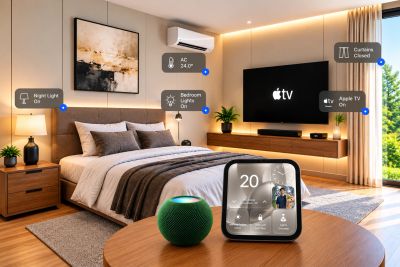
  4. Temperature automations. The AC turns on when it's hot and the curtains close. The AC turns off when it cools down and the curtains open.
  5. Scenes. One tap or one word runs many things. "Goodnight" turns off the lights and sets the AC.
  6. Schedules. Set times for things to run. The geyser turns on at 6 am, and the balcony light turns off at midnight.
  7. Control from anywhere. Check and switch your home from the office or on holiday. This needs a HomePod, HomePod mini or Apple TV at home.
  8. Family sharing. Invite family to your Home. Everyone controls it from their own iPhone.
  9. Your wall switches still work. Nothing changes for staff or guests. Use the switch or the phone.
  10. Works with Apple HomeView. It gives you one screen on the wall for the whole house, so you don't need an extra switch panel.
  11. AC, TV and curtains too. The IR and RF hub controls them like their remotes do.
  12. Shortcuts. You can build your own automations with Apple Shortcuts.
  13. No extra app or account. It works with your own Apple ID. We never ask for your details.
  14. Installed and set up for you. We fit it, set up the Home app and show you how to use it.
  15. 5-year on-site warranty. If anything goes wrong, we respond within 24 hours.

Get in Touch With Us Today

Transform Your Existing Home Into a Smart Apple Home


Why RebuildApple Home?

  • No data sold to advertisers
  • No cloud-based automation dependency
  • No subscription fees
  • No vendor lock-in
  • Fully integrated with Apple Home & Siri


Getting Started is Easy

  1. iPhone or iPad
  2. Apple TV or HomePod (Home Hub)
  3. Wi-Fi Network
  4. RebuildApple Home Controller


If you have any questions or would like to schedule an appointment, please do not hesitate to contact us today. Our friendly and knowledgeable staff are always ready to assist you with your electronics service and repair needs.

Contact Us

How it works

  1. Tell us what you have. WhatsApp us your rooms and appliances.
  2. We visit your home. Our team checks your switch boards and wiring. You get a clear plan and price.
  3. We fit the controller. A small ReBuildHome Controller goes inside your switch board. No walls broken. No new wiring across the house.
  4. Your switches stay. They work exactly as before. Anyone at home can still use them.
  5. We add it to your Home app. Each fan, light and appliance shows up on your iPhone. It links to your own Apple ID. No new app. No sign-up.
  6. Start using it. Tap in the Home app. Ask Siri. Or set it to run by itself, like lights on when you arrive, AC on when it's hot, and everything off when you leave.
  7. We stay with you. 5-year on-site warranty. Any problem, we respond within 24 hours.

Get in Touch With Us Today

Contact Us

Automation Demo

Automation

How automations work

Generate excitement

What's something exciting your business offers? Say it here.

Close the deal

Give customers a reason to do business with you.

Introducing RebuildHome

Open-source home automation, built around you.

We are specialists in Apple ecosystem automation integration, providing a Privacy-First Apple Home Automation System.


Our services include:


- Native Apple HomeKit integration with the Apple Home App

- Siri voice control for seamless smart home integration

- HomeKit secure automation to safeguard your devices

- Room-based device control for personalized environments

- Presence and geolocation automation for enhanced convenience

- Local control (no cloud required) for privacy protection

- Scene and schedule automation to match your lifestyle

- Remote access via Home Hub for flexibility

- Compatibility with existing home retrofit systems

- Support for iPhone, iPad, Apple Watch, and Mac devices


Minimum Requirements:


For a Basic Apple Home Setup📱: 

- iPhone or iPad running the latest version of iOS/iPadOS with the Apple Home app installed.


🏠 Apple Home Hub:

- Apple TV 4K, HomePod mini, or HomePod is required for remote access and advanced automations.


⚡ Rebuild Apple Home Controller:

- Must be installed and connected to your home’s electrical circuits.


🌐 Home Network:

- A Wi-Fi router with an internet connection; an Ethernet connection is recommended for the controller.

  • Homepod
  • AirPods
  • AppleTv
  • Support
  • About Us
  • My Blog
  • Terms and Conditions
  • ReBuildHome_AI
  • Home Survey

ReBuildApple

Building the future by keeping the past Alive.

Copyright © 2026 ReBuildApple - All Rights Reserved.

Powered by

This website uses cookies.

We use cookies to analyze website traffic and optimize your website experience. By accepting our use of cookies, your data will be aggregated with all other user data.

DeclineAccept